
Through the Bot’s Eyes: What AI Actually Sees on Your Website

Chances are you asked AI something before lunch today, whether it was a good CRM for a small team, a running shoe for flat feet, or how to fix that squeaky door hinge. Often the answer names a few brands, products, or sources along the way. And it’s not just for running shoes. In TrustRadius’s 2026 B2B Buying Disconnect report, 63% of technology buyers said they used AI during their purchase journey. So here’s the question worth asking: does AI actually understand what you offer?
If you’ve wondered how your business shows up in AI search, you’re in good company. AI search is when someone gets an answer straight from an AI tool, like Claude, ChatGPT, Perplexity, or the AI Overviews at the top of Google, instead of scrolling through a list of links. It’s one of the most common questions we hear right now, along with a growing pile of acronyms. AEO, GEO… E-I-E-I-O. (That’s answer engine optimization and generative engine optimization, if you’re keeping score.) Maybe you’ve even heard that SEO is dead.
It isn’t. Showing up in AI search builds on the same foundations as good SEO (search engine optimization), making your site easy for search engines to find and understand.
What’s changed is who’s reading. Many AI tools skip your design entirely. They grab a stripped-down text version of the page and leave behind the visuals, the animations, and anything that loads in later. When SEO consultant Glenn Gabe tested pages that rely on JavaScript to load their content, ChatGPT, Claude, and Perplexity came up empty. Tabs, sliders, and accordions can fall into that gap too, depending on how they’re built. If the text is already in the page’s code and just hidden until someone clicks, bots can still read it. Google’s AI features see a bit more, since they’re built on Google Search, but plenty of AI tools don’t.
Level 0: Bring the Bot In
Before any of this matters, AI tools have to reach your page. Many of them rely on crawlers, bots that visit websites and collect what’s on them. Plenty of sites turn those bots away without realizing it. They use a robots.txt file, which tells specific crawlers to stay out, and a noindex tag in a page’s code can keep it out of search results. While these settings can help keep private pages out of search, they can also stop AI tools from reading your content.
The fix: check your robots.txt file (it lives at yoursite.com/robots.txt), ask your web host or developer which bots your security settings allow, and use Google Search Console to confirm your important pages are indexed. Here’s how to get started with Search Console.
Meet Robowright, a completely made-up software company with a very real problem. Its website looks great: bold visuals, smooth animations, a confident tagline. But looks only go so far when your newest visitor can’t see any of it.
In the following sections, you’ll see three ways a website can fall short for AI tools, each with a visual demo. Flip on Bot Mode in the scenarios below to see a page the way many AI tools take it in. Then, we’ll walk through quick wins to fix it.
Before we jump in
A quick confession: to show what bots see, we built these demos with code most AI tools skip. Yes, we’re breaking our own rules, on purpose. The demos are for human eyes, and the note under each one spells out the takeaway in plain text, so the bots still get the point.
Level 1: Say What You Do
AI tools lean heavily on your words, especially your headings, to figure out what a page is about. Where clever taglines can work for people who have visuals and context to fill in the gaps, AI tools read your content at face value, with no visual cues.
Toggle on Bot Mode below, and you’ll see Robowright never actually says what it does.
What the bot sees
Every word is still there, but none of them say what Robowright actually does.
Don't worry, you can keep the personality and still add context. For instance, “Empowering What’s Next” could become “Empowering What’s Next in Construction Project Management.” By adding in these keywords, an AI tool can better understand what you offer.
The subheading should do this work, too. Instead of “Built for the future. Ready for anything,” give AI tools more context, like “Scheduling, budgets, and field updates in one place, built for general contractors and their crews.”
Finally, it's important to have a clear and actionable CTA. "Explore" might make sense to a human, but an AI tool won't have the same visual context. "Book a Demo" is explicit, so people and AI tools both know what to do and what the page is for.
Level 2: Give It a Clear Outline
Imagine reading a research paper: the main title tells you what the topic is about, then subheaders break it down, then supporting points provide more detail.
Many AI tools read web pages in much the same way, relying on headings to understand what’s important and how ideas connect. In code, headings come in levels: the H1 is the page title, H2s are main sections, and H3s are subsections underneath.
The catch is that something can look like a heading without actually being one. Behind the scenes, designers sometimes style regular text to look big and bold. People can’t tell the difference, but AI tools often can. Many AI tools strip a page down to its bare structure before reading it, and in that process, styling disappears. What’s left is the semantic code that tells AI tools what each piece actually is. If it’s not a real heading, it reads like just another sentence.
Toggle on Bot Mode to see how a post on Robowright’s blog really reads.
What the bot sees
Only the title gets a #. The section headings blend into the paragraphs, so a bot can’t tell where one topic ends and the next begins.
The fix: make sure your headings and subheadings are tagged with the proper heading tags, like <h1>, <h2>, and <h3>, not just styled to look big and bold. That’s what makes a real heading, and it sets your page up for AI success.
This means one main title per page, with clear sections underneath. Bonus points for headings that answer real questions, like “What causes budget overruns?” That’s often how people phrase what they ask AI.
Real headings help with accessibility, too. People using screen readers often jump from heading to heading to find their way around a page, much like sighted visitors skim. When a heading is only styled to look like one, there’s nothing for them to land on.
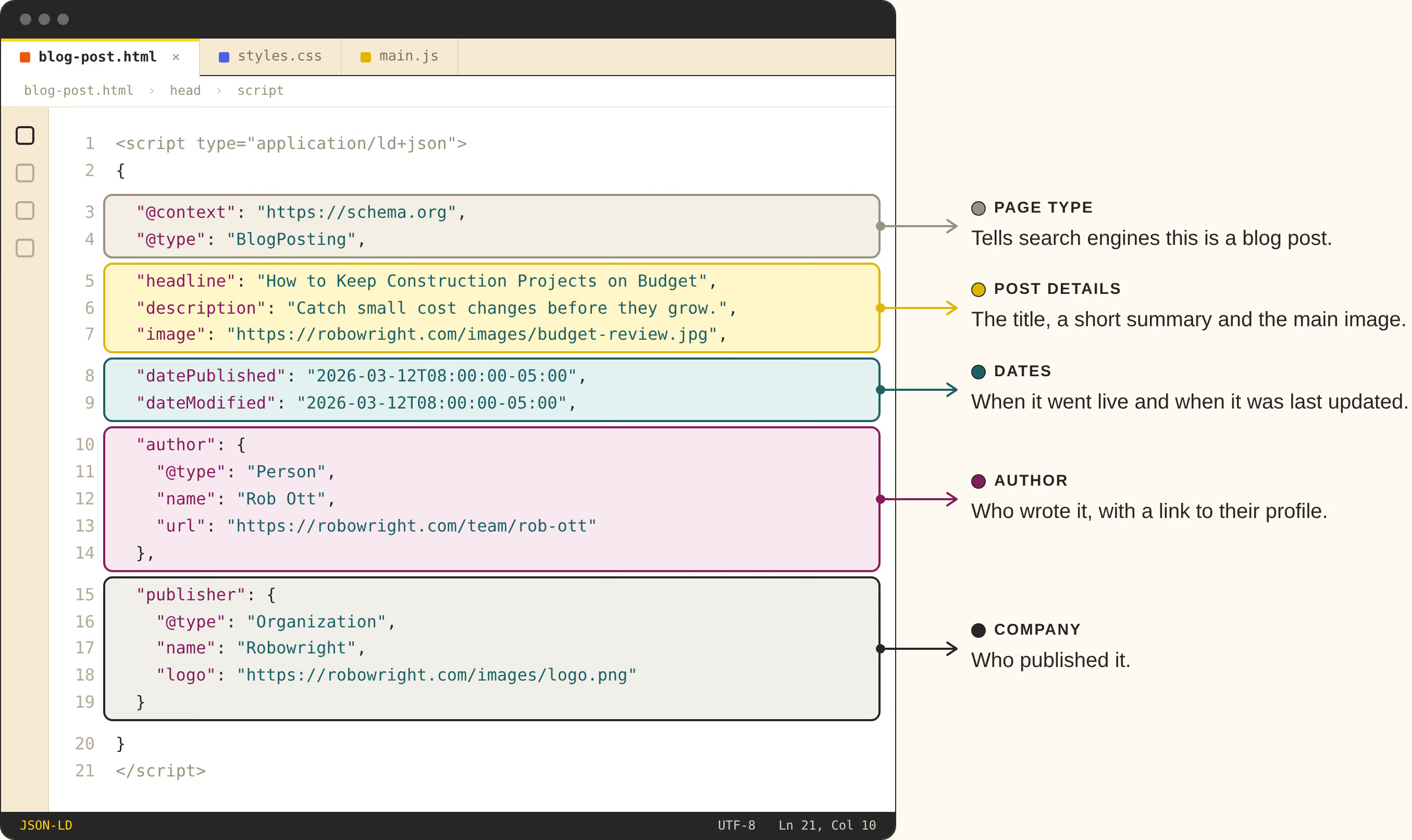
One more layer worth knowing about is schema, a bit of code that labels your content for search engines. On a blog post, article schema spells out the headline, the author, and the publish date, which helps search engines understand who wrote it and when. Google’s AI features draw on the same search systems, so that understanding can carry over. Consider it good housekeeping.
Schema lives behind the scenes in your page’s code, so if you’re not a web developer, you’ll likely never see it, but it’s important that it’s structured properly. (If you're not sure if you have this set up correctly, one of our talented Webfish can take a look for you.)
In the graphic below, we've illustrated what proper schema markup looks like for Robowright's blog post:
Level 3: Describe What You Show
Images carry a lot of meaning for people. A product screenshot or a team photo can say more than a paragraph. But many AI tools don’t look at your images the way people do. They lean on alt text, a short written description attached to each image in the code. Alt text is essential for accessibility, since it’s how people using screen readers know what an image shows. It’s also one of the main ways AI tools understand your images, so it pays off twice.
Toggle on Bot Mode to see what Robowright’s product page is really telling AI tools.
What the bot sees
The banner, features, testimonial, and call to action are all images, so the bot gets blanks and file names instead of words.
Our Robowright example shows two common pitfalls: the screenshot’s only description is a file name, and the banner’s big announcement is part of the image. Without effective alt text, AI tools can’t make meaning of those visuals.
The same applies to screen readers, and to anyone who needs to enlarge or restyle text. The fix: give important images real descriptions, like “Robowright dashboard showing a construction project’s budget and schedule,” and keep key messages as actual text on the page. If text has to live in an image, repeat it in the alt text.
So, Does AI Get You?
There’s no formula that guarantees AI tools will mention you, and anyone promising one is guessing. Even Google says its AI features don’t require any special optimization. Plenty of factors play a role, and even the experts are still learning. But what you’ve seen in Bot Mode is a good place to start: a site the bots can actually get into, clear words that say what you do, real structure that gives your content an outline, and images that explain themselves.
The tools will keep changing, but a well-structured site that’s easy to understand is set up for whatever comes next.
Curious how your site looks through the bot’s eyes? We’d be happy to take a look. Get in touch.